Shopify GSC Indexing and Sitemap Audit
See how Shopify indexing, sitemap, canonical, and URL-pattern issues were reviewed and prioritized.
Read the resource →Shopify handles several Technical SEO foundations automatically, but themes, apps, collection paths, filters, parameters, redirects, and product markup can still create conflicting signals that require systematic auditing.
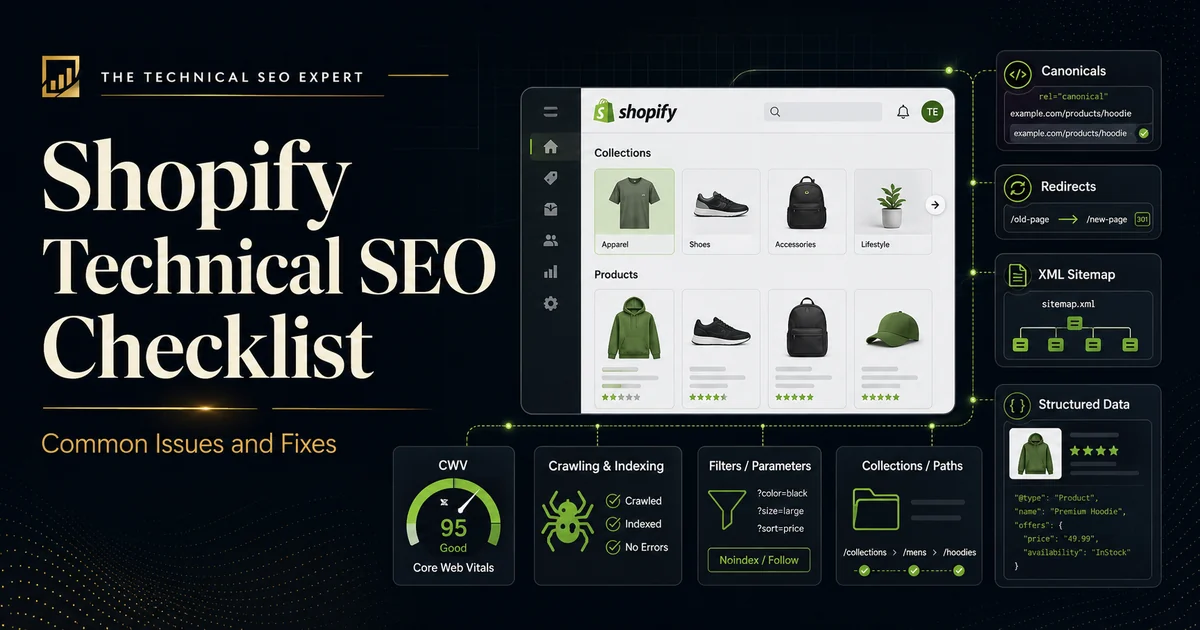
Shopify removes several infrastructure decisions that store owners would otherwise need to manage manually. It generates a sitemap, provides a
robots.txt
file, adds canonical tags, uses HTTPS, and offers built-in performance reporting.
That does not make every Shopify store technically optimized.
A theme can link to several versions of the same product. Filters can generate large numbers of URLs. Apps can inject scripts, markup, tracking parameters, or duplicate structured data. A product-handle change can leave broken links behind, while a technically valid canonical tag may be undermined by internal links pointing elsewhere.
The correct approach is not to fight every URL Shopify generates. It is to decide which pages should be indexed, identify patterns that create unnecessary crawling or conflicting signals, and prioritize the issues affecting valuable products and collections.
If the store has recurring indexing issues, complex templates, app conflicts, or revenue-critical collection pages at risk, review when to hire a Technical SEO specialist before making structural changes.
Shopify provides several Technical SEO foundations by default, including:
sitemap.xml
robots.txt
file
These foundations are useful, but they do not control everything added by themes, apps, custom Liquid code, navigation, filters, product variants, redirects, or store configuration.
An audit is still necessary because Shopify can generate the right canonical while a theme repeatedly links to the wrong URL. The platform may create a valid sitemap while the product pages inside it remain thin, inaccessible through internal links, or excluded from Google for another reason.
When Shopify URL, app, theme, and indexing signals become difficult to separate, a technical SEO expert review can help determine whether the issue is platform behavior, theme output, app code, or weak internal signals.
Start by deciding which URL types should normally be eligible for indexing.
For most Shopify stores, the useful indexable inventory may include:
URLs that normally do not need independent indexing include:
Do not judge the store by the total number of excluded URLs in Google Search Console. Ecommerce platforms naturally expose URLs that Google does not need to index.
The more important question is whether the preferred versions of valuable products, collections, and content pages are crawlable, indexable, canonical, internally linked, and included in the sitemap.
Use a Technical SEO audit checklist when the store requires a broader review of status codes, directives, rendering, site architecture, and page templates.
A Shopify product can often be reached through its standard URL:
It may also be accessible through a collection-context path:
Additional versions can appear through:
Shopify’s Liquid within filter can generate a product URL inside a collection context. The page content may remain the same even though the URL changes.
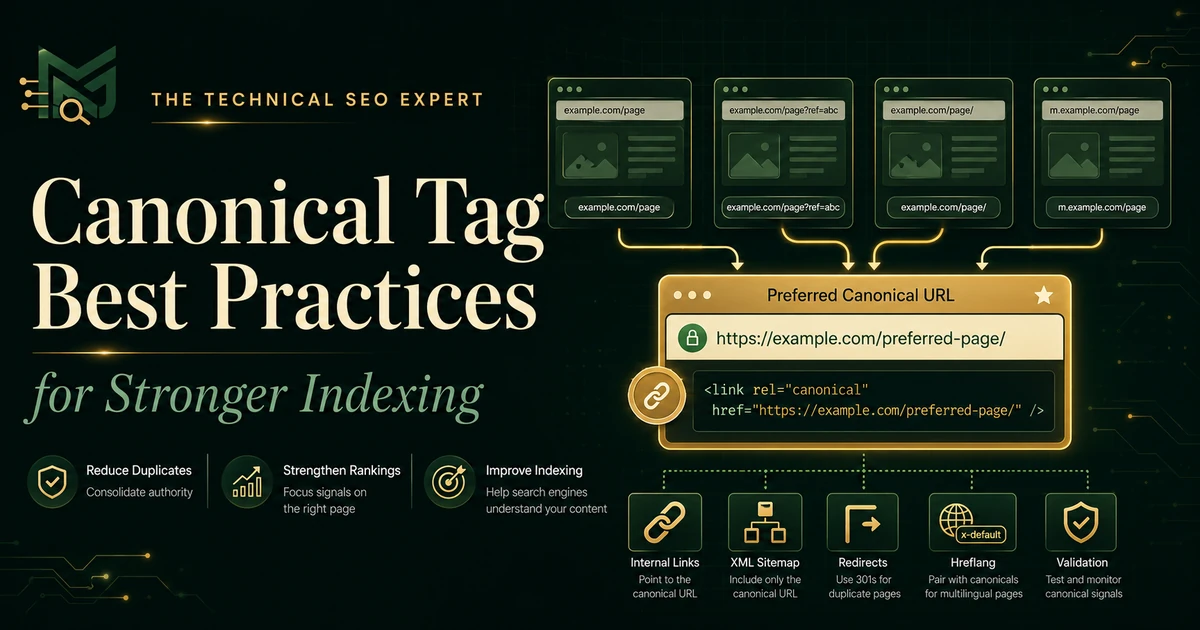
Canonical tags can consolidate these alternate versions, but internal linking should still be reviewed.
Check:
Where possible, link consistently to the clean canonical product URL rather than relying on Google to reconcile every internally linked variation.
A canonical tag is helpful, but it should not be employed as the website’s full-time conflict-resolution department.
Shopify storefronts can generate URLs through:
Some filtered pages may be useful to shoppers. That does not mean every combination should become a search landing page.
For example, combining colour, size, price, vendor, availability, and sorting options can create many URL variations with limited or duplicate content.
Review whether Google can discover large numbers of:
Do not block every parameter automatically. First determine whether the URL is internally linked, whether Google already crawls it heavily, whether it has search value, and whether it is needed for users.
The appropriate control may involve cleaner internal links, selective crawl restrictions,
noindex
directives, canonicalization, theme changes, or reducing the number of generated crawl paths.
Faceted-navigation decisions require care because an aggressive rule can hide useful products, while an overly permissive setup can create a crawl space large enough to keep an audit tool entertained indefinitely.
Shopify exposes the current page’s canonical URL through its
canonical_url
Liquid object, and standard themes normally output canonical tags automatically.
Problems can still appear when:
For each important product and collection, confirm that:
Use the complete guide to canonical-tag best practices when the store contains multiple tags, redirecting targets, non-indexable canonicals, or inconsistent template output.
I review indexing, canonicals, collection and product templates, structured data, internal linking, and performance to turn Shopify SEO problems into clear technical actions.
Shopify creates a default
robots.txt
file intended to work for most stores. It can be customized through
robots.txt.liquid
, but modification should solve a documented crawling problem.
Robots.txt controls crawler access. It does not reliably prevent a URL from appearing in search results.
A
noindex
directive controls indexing, but Google must normally crawl the page to detect it.
Common mistakes include:
robots.txt
while expecting Google to see its
noindex
directive
robots.txt
recommendations from a different Shopify store
robots.txt
to address duplicate URLs without reviewing internal links and canonicals
noindex
rules active after the app or campaign changes
Before editing
robots.txt.liquid
, document:
A default file should not be customized merely because a third-party crawler produced a long list of parameters.
Shopify stores change frequently. Products are discontinued, collection handles are renamed, campaigns end, and categories are reorganized.
Audit:
The appropriate action depends on the situation.
Keep the product page live when the product may return, still attracts useful traffic, or can help customers understand availability and alternatives.
Redirect the URL when a close replacement or clearly relevant successor exists.
Return 404 or 410 when the product is permanently gone and no relevant replacement exists.
Avoid redirecting every unavailable product to the homepage or a broad collection. A redirect should help the user continue the same task, not simply avoid displaying an error page.
When handles change, update internal links so they point directly to the new URL rather than depending permanently on the redirect.
Shopify performance problems often come from the storefront layer rather than the core platform. For a focused next step, review Core Web Vitals audit.
Common contributors include:
Shopify’s Web Performance reports use real-user data for:
Review performance by page type and URL rather than relying on one homepage test.
If performance declined after a theme update or app installation, compare the timing of that change with Shopify’s reports. Then test representative product, collection, and content pages with PageSpeed Insights.
Prioritize problems that affect the shopping journey:
The objective is not a perfect score. It is a storefront that loads, responds, and remains visually stable for real shoppers.
Shopify themes often output Product structured data. Apps for reviews, product feeds, subscriptions, variants, or SEO may add additional markup. For a focused next step, review schema markup audit.
This can create:
Review important product templates for:
Google supports product-variant structured data using ProductGroup and related Product entities. The implementation must reflect how the store presents variants and whether each variant has its own distinct URL.
Do not add another schema app merely because the existing validation report contains a warning. First identify which theme or app produces each structured-data block and whether the values agree.
Use Google’s Rich Results Test and inspect the rendered JSON-LD. Warnings may indicate optional enhancements; errors affecting required properties deserve higher priority.
Use the following order:
Then consider:
A canonical problem affecting every product page should normally outrank a structured-data warning on one low-traffic item.
Validation should combine Shopify, crawling tools, and Google data.
Use:
Inspect representative URLs from each affected pattern.
For indexing corrections, compare Google’s stored information with Test Live URL. For canonicals, compare the user-declared and Google-selected versions. For redirects, crawl the original URL list. For performance, compare real-user reports before and after the change.
The complete guide to diagnosing indexing issues in Google Search Console can help separate normal excluded Shopify URLs from important products or collections that require action.
Do not close the task merely because the code was changed. Technical SEO implementation is complete only when the new condition has been tested and the expected result can be observed.
Shopify provides useful Technical SEO foundations, including generated canonicals, sitemaps,
robots.txt
, HTTPS, and standard URL structures. Themes, apps, navigation, parameters, performance, and store configuration still require auditing.
A product may be available through its standard product path, a collection-context path, and parameterized variants. These versions may show the same content, so canonical tags and consistent internal links are important.
Usually not unless you have identified a specific crawling problem and understand the effect of the proposed change. Shopify’s default
robots.txt
is suitable for most stores, and incorrect customization can block useful content or resources.
First identify the URL pattern and determine which version should be preferred. Then align canonical tags, internal links, sitemaps, redirects, and crawl controls around that URL rather than applying one blanket rule to every duplicate.
Yes. Apps can add scripts, tracking parameters, redirects, meta tags, structured data, and storefront elements. Audit both active and previously removed apps when duplicate markup, performance changes, or unexpected tags appear.
Run an audit after major theme changes, app installations, URL restructuring, migrations, or unexpected organic declines. High-volume stores should also monitor indexing, broken links, performance, and product-template output routinely.
Many Shopify SEO problems begin as storefront and marketing decisions rather than technical settings. See how merchandising decisions affect Shopify SEO before changing major collections, navigation, seasonal pages, or product lifecycle rules.
Shopify handles several Technical SEO foundations automatically, but it cannot decide which of your products, collections, filters, variants, and parameters deserve search visibility.
Start by defining the preferred indexable URL inventory. Then check alternate product paths, filter proliferation, canonical consistency, robots controls, broken URLs, redirects, theme and app performance, and product structured data.
Prioritize problems affecting important products and collections before optional enhancements. A clean technical setup should make the preferred storefront URLs easy to crawl, index, understand, and use without requiring search engines to reconcile unnecessary contradictions.
When a store contains widespread duplicate URL patterns, app-generated conflicts, indexing problems, or theme-level issues, Technical SEO audit and implementation support can help identify the source, prioritize the fixes, and validate the result.

Clear diagnosis, practical fixes, and excellent communication.
Verified Upwork feedback